Product updates worth reading
A short email when we ship something useful for shop-floor teams.
You can unsubscribe anytime. By subscribing you agree to our Privacy Notice.
One timeline carries every component date up to the date you promised the customer.
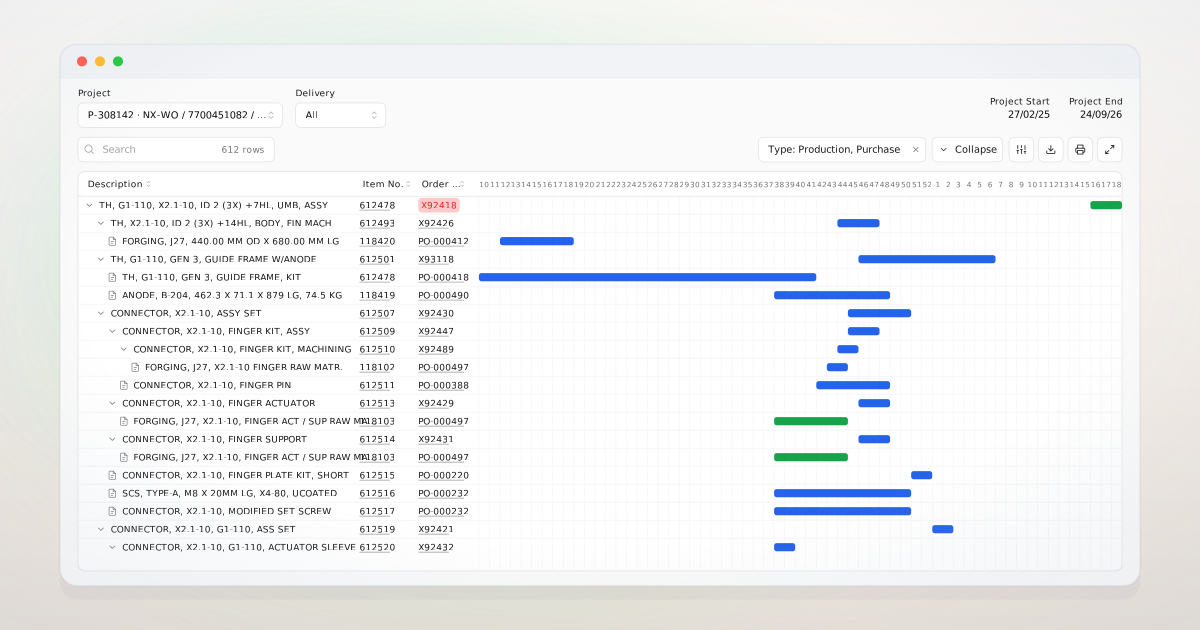
A customer calls Friday afternoon asking when their order will ship. Components Timeline lays the project's production and purchase rows on one week grid. The project manager reads the answer in the same minute, and can point at the component that is the constraint.
Project shows a single project as a week-by-week timeline. Production rows span their planned dates, purchase rows span order to in-house dates, and progress follows what has actually been posted and received. The active bill of materials is chosen automatically, so the plan reflects the version that will be built. An operation still under way can be replanned in place by moving its anchor date; the change writes back to Business Central and the timeline redraws. Beside the timeline, an on-time delivery view tracks every open sales line as promised date against projected date, charting the ratio over time.
When a vendor pushes a date, the project manager sees it move on the timeline the same day, calls the customer before sales hears about it, and offers a new date that comes from the same source as the production order. Project sponsors and executives read the on-time ratio at the start of each week. Sales books the next quote against the dates the timeline shows. The Friday afternoon call ends in five minutes.
Describe how your projects run and it will tell you what a project manager would see.
Budget Revision tracks the same project against budget and posted actuals.
Production and routing rows come straight from production orders; replanning writes back to them.
Purchased components sit on the same timeline as the parts they feed.
Book a meeting and we will look at how you track project budgets today, then show how Budget Revision keeps a dated trail of plan against actuals per project. If it is not a fit, we will say so.
A short email when we ship something useful for shop-floor teams.
You can unsubscribe anytime. By subscribing you agree to our Privacy Notice.